Alcora est une application de bureau native pour les caméras UniFi Protect, sur Windows et Linux. Elle parle directement à votre console, sur votre réseau : pas de compte Ubiquiti, pas de navigateur, pas de dépendance à Internet. Direct, relecture, détections, recherche et alertes.
Alcora is a native desktop application for UniFi Protect cameras, on Windows and Linux. It talks directly to your console, on your own network: no Ubiquiti account, no browser, no dependency on the Internet. Live view, replay, detections, search and alerts.
Alcora ist eine native Desktop-Anwendung für UniFi-Protect-Kameras, für Windows und Linux. Sie spricht direkt mit deiner Konsole, in deinem Netzwerk: kein Ubiquiti-Konto, kein Browser, keine Abhängigkeit vom Internet. Live, Wiedergabe, Erkennungen, Suche und Alarme.
Alcora è un'applicazione desktop nativa per le telecamere UniFi Protect, su Windows e Linux. Parla direttamente alla tua console, sulla tua rete: nessun account Ubiquiti, nessun browser, nessuna dipendenza da Internet. Diretta, riproduzione, rilevamenti, ricerca e avvisi.
Gratuit · open source, GPL-3.0 · aucune image ne quitte votre réseau
Free · open source, GPL-3.0 · no image ever leaves your network
Gratis · Open Source, GPL-3.0 · kein Bild verlässt dein Netzwerk
Gratuito · open source, GPL-3.0 · nessuna immagine lascia la tua rete
Une reproduction de l'interface, sur des données simulées — deux images fixes tiennent lieu de caméras. Les gestes sont ceux de l'application : molette pour zoomer dans l'image, glisser pour s'y déplacer, double-clic ou touches 1/2/0 pour isoler, la relecture sur sa frise, la recherche et ses filtres. L'application parle français, anglais, allemand et italien — comme cette page.
A reproduction of the interface, on simulated data — two still images stand in for cameras. The gestures are the application's own: mouse-wheel to zoom into the image, drag to move around, double-click or keys 1/2/0 to isolate, replay on its timeline, search and its filters. The application speaks French, English, German and Italian — like this page.
Eine Nachbildung der Oberfläche, mit simulierten Daten — zwei Standbilder vertreten die Kameras. Die Gesten sind die der Anwendung: Mausrad zum Zoomen ins Bild, Ziehen zum Bewegen, Doppelklick oder Tasten 1/2/0 zum Isolieren, die Wiedergabe auf ihrer Zeitleiste, die Suche und ihre Filter. Die Anwendung spricht Französisch, Englisch, Deutsch und Italienisch — wie diese Seite.
Una riproduzione dell'interfaccia, su dati simulati — due immagini fisse fanno da telecamere. I gesti sono quelli dell'applicazione: rotella per zoomare nell'immagine, trascinare per muoversi, doppio clic o tasti 1/2/0 per isolare, la riproduzione sulla sua linea del tempo, la ricerca e i suoi filtri. L'applicazione parla francese, inglese, tedesco e italiano — come questa pagina.
Aucune image ne quitte votre réseau.
Alcora 2.25.0 — à jour. La mise à jour se vérifie à chaque lancement, se contrôle par empreinte et s'applique seule.
Les caméras en mosaïque, dimensionnées automatiquement, réorganisables à la souris. Un trait lumineux entoure la caméra où une détection est en cours, avec son sujet en étiquette.
Cameras in an automatically sized mosaic, reorderable with the mouse. A light trace surrounds the camera where a detection is in progress, with its subject as a label.
Die Kameras im automatisch dimensionierten Mosaik, mit der Maus umzuordnen. Ein Lichtstreifen umrahmt die Kamera, auf der gerade eine Erkennung läuft, mit ihrem Motiv als Etikett.
Le telecamere in un mosaico dimensionato automaticamente, riordinabile con il mouse. Un tratto luminoso circonda la telecamera dove un rilevamento è in corso, con il suo soggetto in etichetta.
Une journée entière se parcourt sur une frise, les détections en repères. La lecture s'enchaîne sans coupure, de 0,25× à 2×, avec l'audio et l'image par image.
A whole day browses on a timeline, detections as markers. Playback chains without interruption, from 0.25× to 2×, with audio and frame stepping.
Ein ganzer Tag lässt sich auf einer Zeitleiste durchlaufen, die Erkennungen als Marken. Die Wiedergabe läuft ohne Schnitt, von 0.25× bis 2×, mit Ton und Bild für Bild.
Una giornata intera si percorre su una linea del tempo, i rilevamenti come riferimenti. La lettura si concatena senza tagli, da 0,25× a 2×, con l'audio e il fotogramma per fotogramma.
Recherche par sujet, type de véhicule, couleur, caméra ou plaque. Les filtres ne proposent que ce qui existe dans votre archive, avec leur nombre.
Search by subject, vehicle type, colour, camera or licence plate. Filters only offer what exists in your archive, with their counts.
Suche nach Motiv, Fahrzeugtyp, Farbe, Kamera oder Kennzeichen. Die Filter bieten nur an, was in deinem Archiv existiert, mit seiner Anzahl.
Ricerca per soggetto, tipo di veicolo, colore, telecamera o targa. I filtri propongono solo ciò che esiste nel tuo archivio, con il loro numero.
Des règles propres à Alcora, indépendantes de l'armement de Protect : sujets, caméras, plages horaires, son. Chaque règle affiche le volume de notifications qu'elle aurait produit, mesuré sur votre archive.
Rules of Alcora's own, independent from Protect's arming: subjects, cameras, schedules, sound. Each rule shows the notification volume it would have produced, measured on your archive.
Regeln, die Alcora gehören, unabhängig von der Scharfschaltung von Protect: Motive, Kameras, Zeitfenster, Ton. Jede Regel zeigt die Meldungsmenge, die sie erzeugt hätte — gemessen an deinem Archiv.
Regole proprie di Alcora, indipendenti dall'attivazione di Protect: soggetti, telecamere, fasce orarie, suono. Ogni regola mostra il volume di notifiche che avrebbe prodotto, misurato sul tuo archivio.
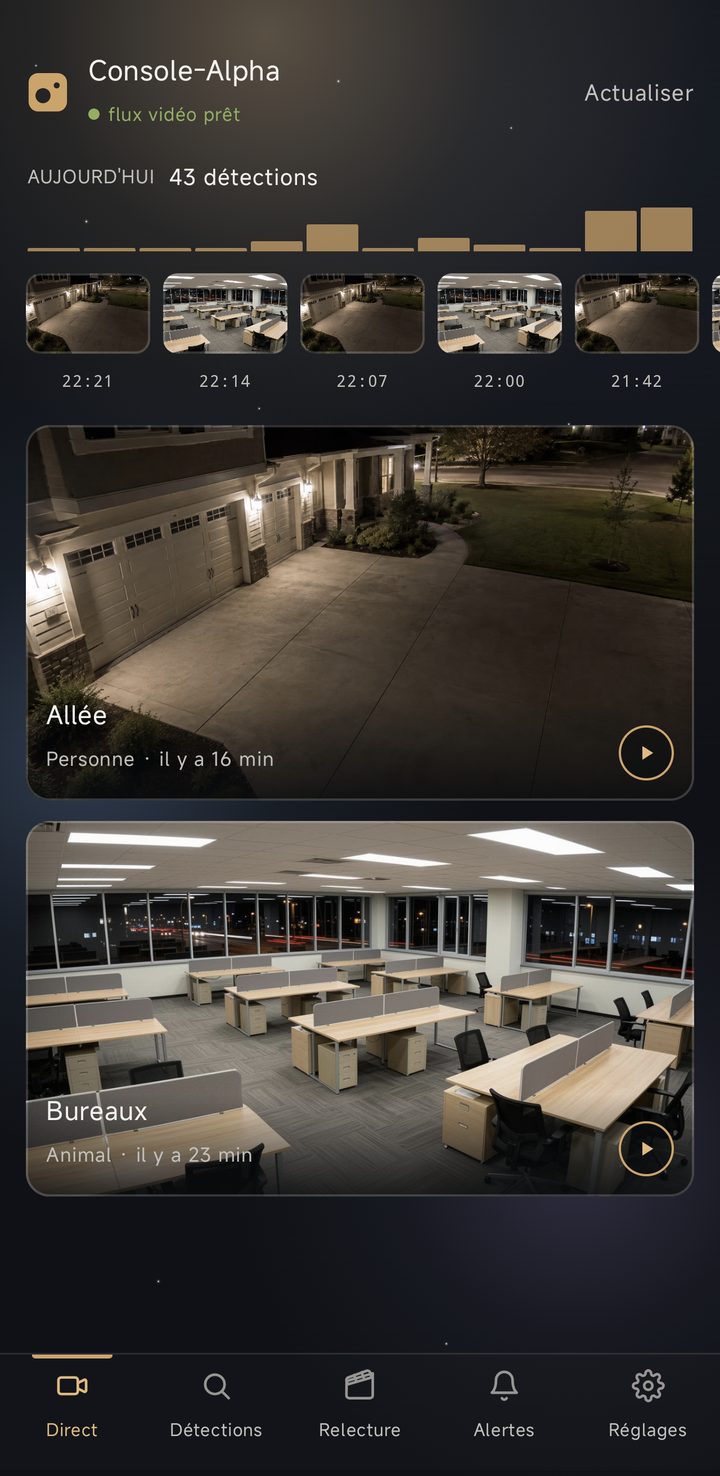
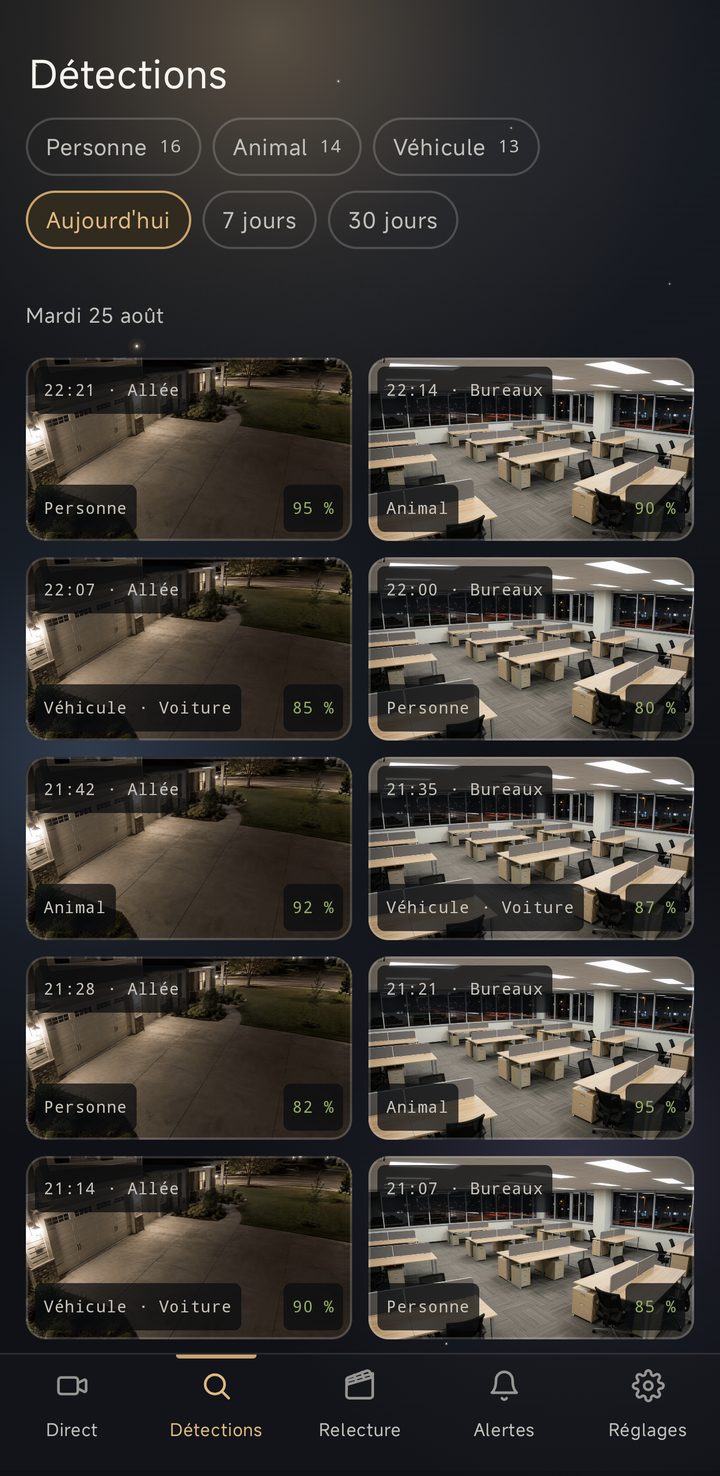
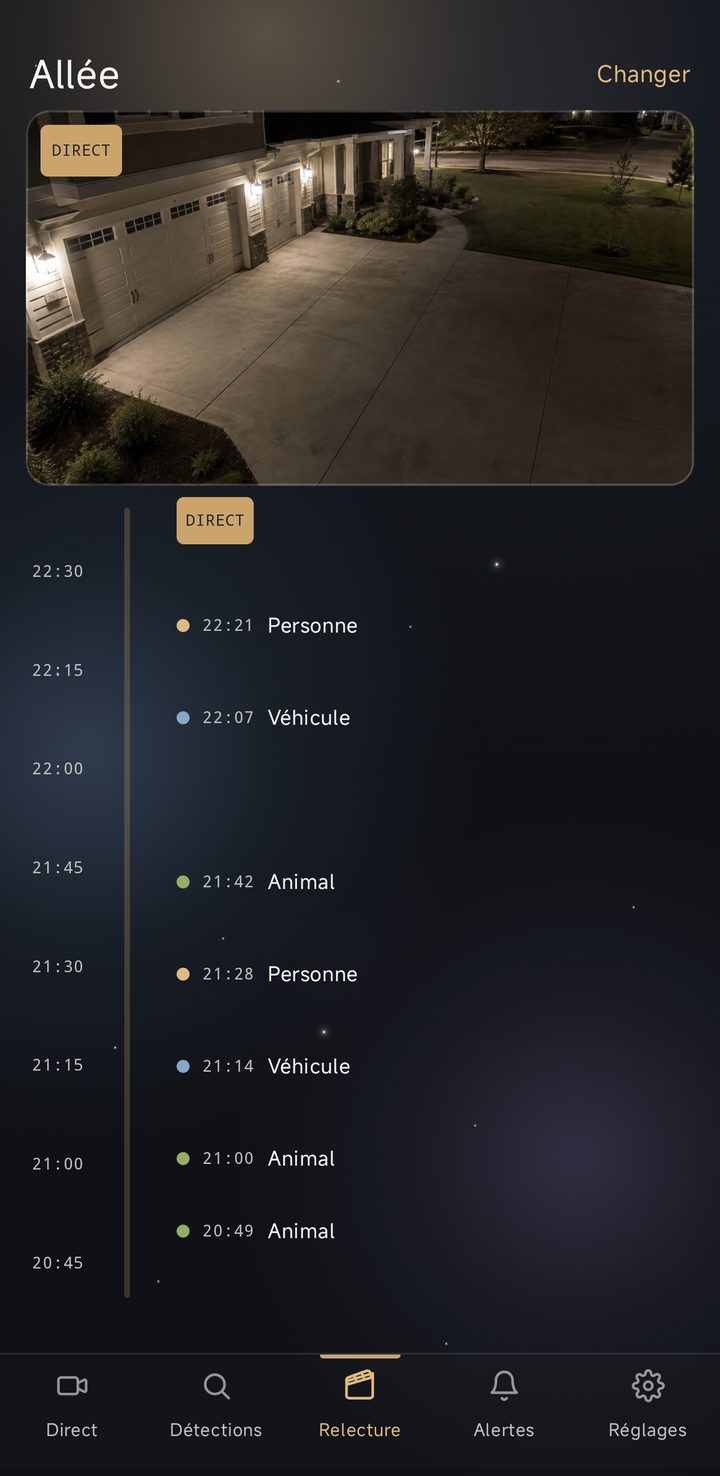
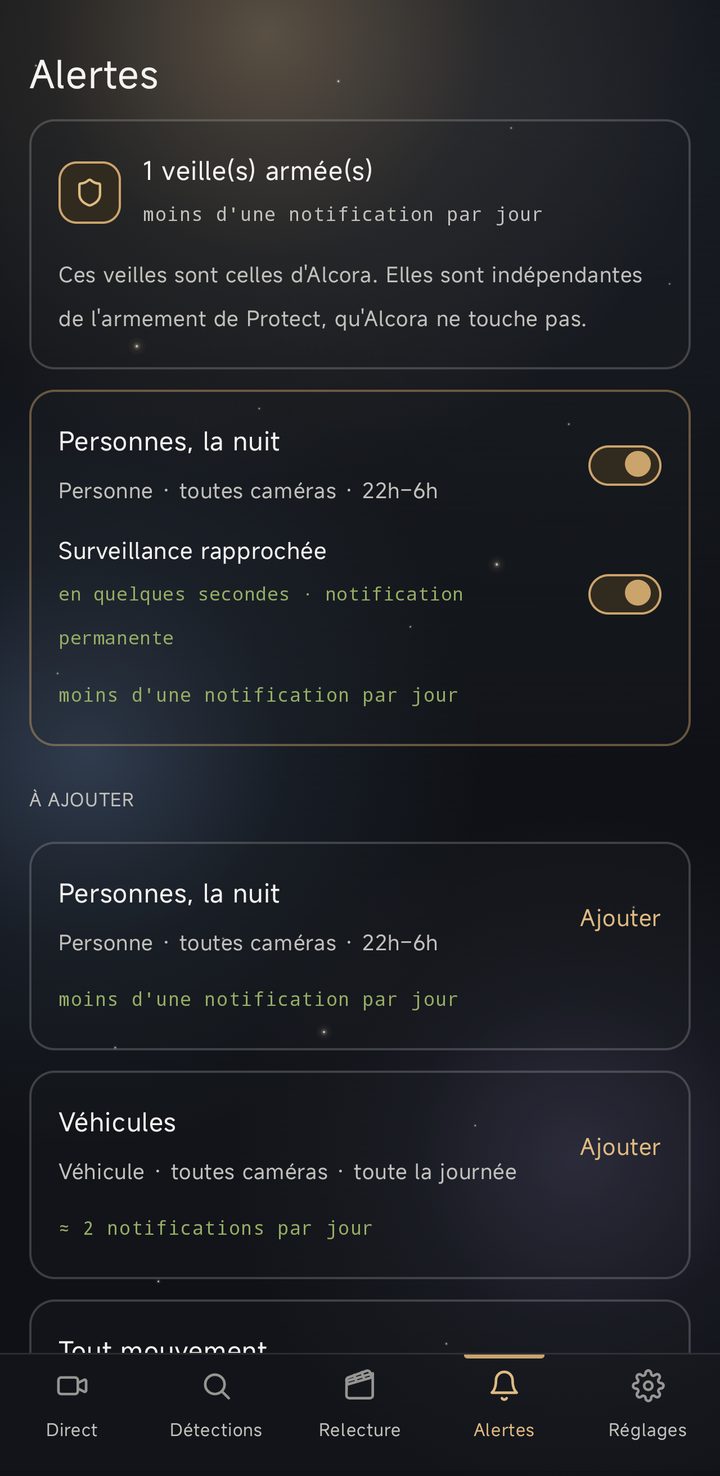
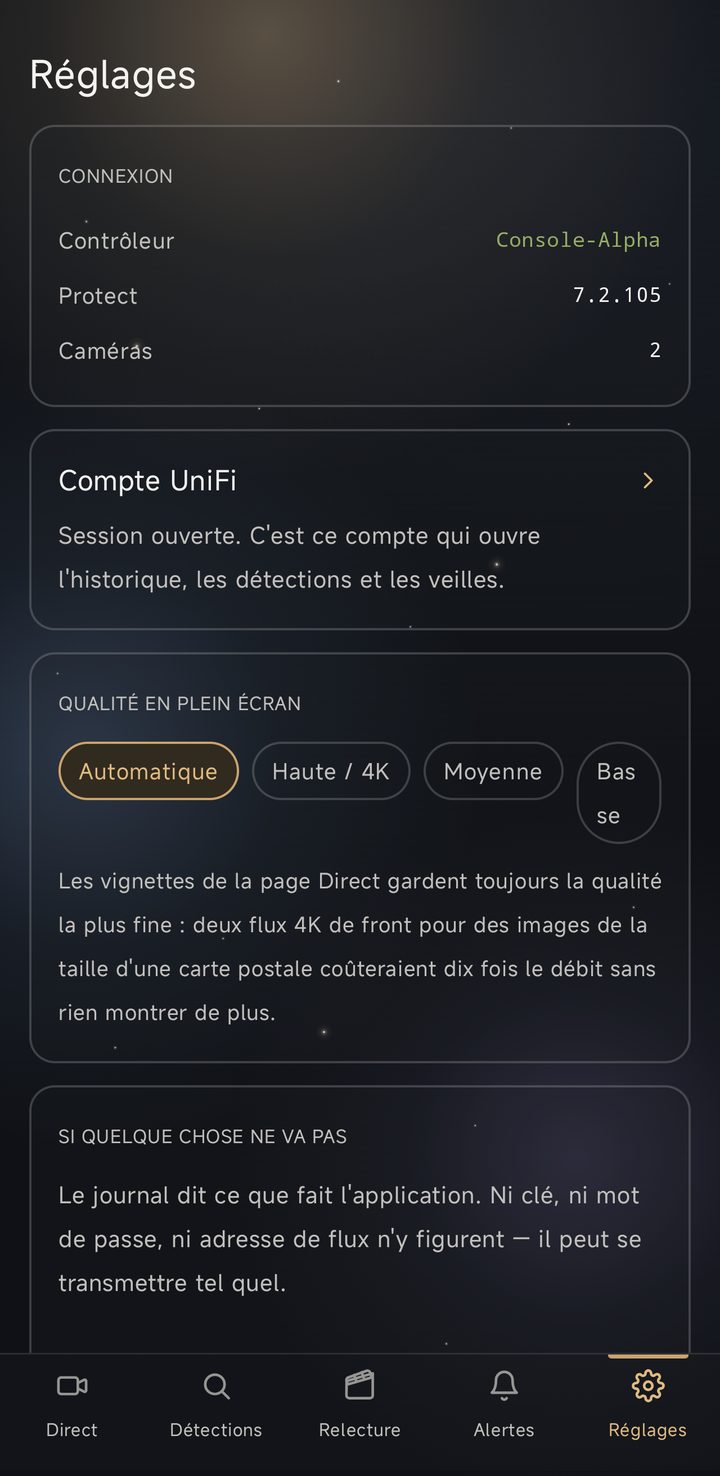
Une application Android reprend les mêmes fonctions sur un téléphone : direct, détections, relecture et alertes. Elle parle directement à la console, sur le réseau local, sans compte tiers ni service distant. Les captures ci-dessous proviennent de l'application, sur des caméras simulées.
An Android application carries the same functions to a phone: live view, detections, replay and alerts. It talks directly to the console, on the local network, with no third-party account and no remote service. The screenshots below come from the application, on simulated cameras.
Eine Android-Anwendung bringt dieselben Funktionen auf das Telefon: Live, Erkennungen, Wiedergabe und Alarme. Sie spricht direkt mit der Konsole, im lokalen Netzwerk, ohne Drittkonto und ohne entfernten Dienst. Die Aufnahmen unten stammen aus der Anwendung, mit simulierten Kameras.
Un'applicazione Android porta le stesse funzioni sul telefono: diretta, rilevamenti, riproduzione e avvisi. Parla direttamente con la console, sulla rete locale, senza account di terzi né servizio remoto. Le immagini seguenti provengono dall'applicazione, su telecamere simulate.
L'application Android n'est pas encore distribuée.
The Android application is not yet distributed.
Die Android-Anwendung wird noch nicht verteilt.
L'applicazione Android non è ancora distribuita.
Alcora communique avec votre console et, pour ses mises à jour, avec GitHub. Avec rien d'autre. L'identité de la console est épinglée après le premier appairage ; les identifiants sont chiffrés par Windows, liés à votre session ; le relais vidéo n'écoute qu'en local. Sans Internet, tout fonctionne — seules les mises à jour attendent.
Alcora communicates with your console and, for updates, with GitHub. With nothing else. The console's identity is pinned after first pairing; credentials are encrypted by Windows, bound to your session; the video relay listens on localhost only. Without Internet, everything works — only updates wait.
Alcora kommuniziert mit deiner Konsole und, für die Updates, mit GitHub. Mit sonst nichts. Die Identität der Konsole wird nach der ersten Kopplung angeheftet; die Zugangsdaten sind von Windows verschlüsselt, an deine Sitzung gebunden; das Videorelais hört nur lokal. Ohne Internet funktioniert alles — nur die Updates warten.
Alcora comunica con la tua console e, per gli aggiornamenti, con GitHub. Con nient'altro. L'identità della console è fissata dopo il primo abbinamento; le credenziali sono cifrate da Windows, legate alla tua sessione; il relè video ascolta solo in locale. Senza Internet, tutto funziona — solo gli aggiornamenti attendono.
Une archive .tar.gz à déplier, qui embarque son propre relais vidéo :
tar xzf Alcora-…-linux-x64.tar.gz puis lancer ./Alcora.
Testée sur x86-64. Deux différences avec Windows, que l'application annonce
elle-même : la mise à jour est manuelle — reprenez l'archive ici quand une version
paraît — et le démarrage à l'ouverture de session n'est pas disponible.
A .tar.gz archive to unpack, carrying its own video relay:
tar xzf Alcora-…-linux-x64.tar.gz then run ./Alcora.
Tested on x86-64. Two differences from Windows, which the application states
itself: updating is manual — come back for the archive when a version appears —
and start-at-login is not available.
Ein .tar.gz-Archiv zum Entpacken, mit eigenem Video-Relais:
tar xzf Alcora-…-linux-x64.tar.gz, dann ./Alcora starten.
Getestet auf x86-64. Zwei Unterschiede zu Windows, die die Anwendung selbst nennt:
Die Aktualisierung ist manuell — hol dir das Archiv erneut, wenn eine Version
erscheint — und der Start bei der Anmeldung ist nicht verfügbar.
Un archivio .tar.gz da estrarre, con il proprio relè video:
tar xzf Alcora-…-linux-x64.tar.gz poi avviare ./Alcora.
Testato su x86-64. Due differenze rispetto a Windows, che l'applicazione dichiara
da sé: l'aggiornamento è manuale — riprendi l'archivio qui quando esce una
versione — e l'avvio all'accesso non è disponibile.
Le certificat de signature est auto-émis plutôt qu'acheté à une autorité commerciale. La signature garantit l'intégrité du binaire ; l'avertissement dit seulement que Windows ne connaît pas l'éditeur.
The signing certificate is self-issued rather than bought from a commercial authority. The signature guarantees the binary's integrity; the warning only says Windows does not know the publisher.
Das Signaturzertifikat ist selbst ausgestellt statt bei einer kommerziellen Stelle gekauft. Die Signatur garantiert die Unversehrtheit der Binärdatei; die Warnung sagt nur, dass Windows den Herausgeber nicht kennt.
Il certificato di firma è auto-emesso invece che comprato da un'autorità commerciale. La firma garantisce l'integrità del binario; l'avviso dice solo che Windows non conosce l'editore.
Tout fonctionne : Alcora ne dépend que de votre réseau local. Internet ne sert qu'aux mises à jour, qui attendent sans gêner le reste.
Everything works: Alcora only depends on your local network. The Internet is only used for updates, which simply wait.
Alles funktioniert: Alcora hängt nur von deinem lokalen Netzwerk ab. Das Internet dient nur den Updates, die einfach warten.
Tutto funziona: Alcora dipende solo dalla tua rete locale. Internet serve solo agli aggiornamenti, che semplicemente attendono.
Alcora est construite pour x64 et fonctionne en émulation sur Windows ARM64 — vérifié en conditions réelles, lecture vidéo comprise.
Alcora is built for x64 and runs emulated on Windows ARM64 — verified in real conditions, video playback included.
Alcora ist für x64 gebaut und läuft emuliert auf Windows ARM64 — unter realen Bedingungen geprüft, Videowiedergabe inbegriffen.
Alcora è costruita per x64 e funziona in emulazione su Windows ARM64 — verificato in condizioni reali, lettura video compresa.
Oui : github.com/alcora-ch/Alcora, sous licence GPL-3.0. Les binaires signés et leur manifeste de vérification sont publiés à côté.
Yes: github.com/alcora-ch/Alcora, under GPL-3.0. The signed binaries and their verification manifest are published alongside.
Ja: github.com/alcora-ch/Alcora, unter GPL-3.0. Die signierten Binärdateien und ihr Prüfmanifest werden daneben veröffentlicht.
Sì: github.com/alcora-ch/Alcora, sotto GPL-3.0. I binari firmati e il loro manifesto di verifica sono pubblicati accanto.